and Baby Boomers
 My Friends it is time to Blog.
I know there are plenty of you “baby boomers” that are not blogging yet. Last year I was terrified about the idea of having a blog that others could view, not because I’m shy about expressing myself, but because I really did not know how to get started. I’m learning more everyday and believe me if I can do it, you can do it too.
What is a Blog?
From “Web log. ”A blog, is basically a journal that is available on the web. The activity of updating a blog is “blogging” and someone who keeps a blog is a “blogger.”
Blogging is a smart strategy for Business owners to promote their products and services at minimum costs.
Pick a Platform : WordPress.org
I will save you some headaches. Choose WordPress.org over WordPress.com because with .org you can pick your own blog name, related to yourself or to Subjects you want to write about. You will have access to more “themes”, widgets and Plug ins too. WordPress.org requires you to use a host and we will get to that soon.
Steps I Chose to Follow:
Note: It is possible to get discounted rates if you use the Affiliate Banner Coupons on this blog
1. Think about what you want to write about, something you are passionate about
Reminder: You want to use WordPress.org over WordPress.com because, you want to have control of your posts incase you want to move to another format. You will have access to more “bells and whistles with .org.
2. Next go to www.GoDaddy.com and pick out a domain name that represents You or the Subject of your blog.
3. Next go to www.Hostgator.com and have Hostgator host your blog for a few bucks a month, since I have multiple blogs, I have chosen Hostgator’s unlimited hosting for less than $10 monthly.
4. Then return to GoDaddy and change the Name Servers to point to your Hostgator account.
5. Then return to Hostgator.com and go to the Control Panel
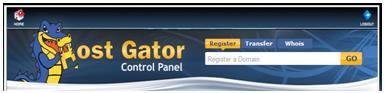
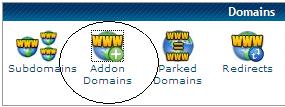
Next: scroll
down toward bottom to Domains – click on Addon
Domains –
Insert your new Domain name.
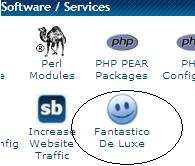
Next, go back to Control Panel, scroll down to
Fantastico De Luxe, click icon.
Next click on WordPress

Now, simply click on “visit site”
From your Blog “dashboard” you can choose your theme, and start writing your blog. Simply type in the box, save, preview, edit if needed and publish.